
AI Autopilot is an AI-powered automation system that automatically analyzes your content, selects the most suitable notifications, and sends push notifications based on predefined rules.
Getting Started with AI Autopilot Setup
AI Autopilot setup is configured within the selected application.
- Select your application from the main dashboard
- After entering the application, click the AI Autopilot section from the left menu
- Start the setup wizard
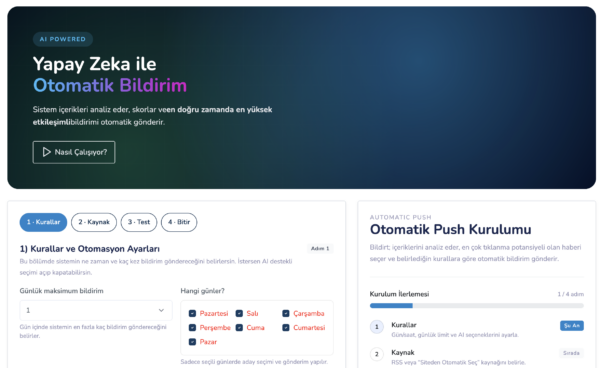
Setup مراحل
The AI Autopilot setup consists of 3 steps.
Step 1: Rules and Automation Settings
In this step, the core rules that define how AI Autopilot operates are configured.
- Daily maximum notification limit
- Days when Autopilot will run
- Time range for sending notifications
The system distributes notifications evenly within the selected time range.
In the category filtering section, you can restrict Autopilot to work only with specific content categories. This setting is optional.
In the title generation setting, you can define the click aggressiveness of notifications:
- Soft
- Balanced (default)
- High Click
There are two critical settings on this screen:
- AI Selection: Determines whether AI Autopilot is active
- Auto Send: Determines whether notifications are sent automatically or manually
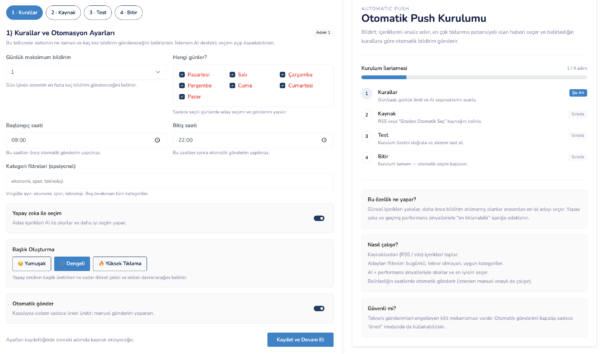
After completing the settings, proceed to the second step with Save and Continue.
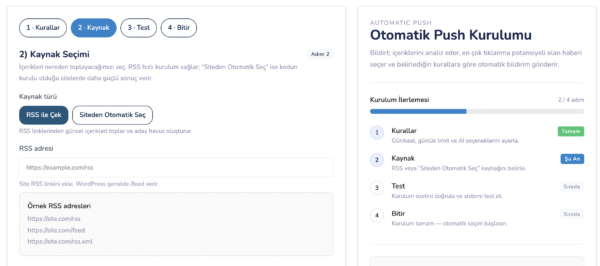
Step 2: Source Selection
In this step, you define where AI Autopilot will retrieve content from.
- RSS: Content is fetched from specified RSS feeds
- Automatic Site Crawling: Your website is automatically scanned (recommended)
After selecting the source, continue with Save and Continue.
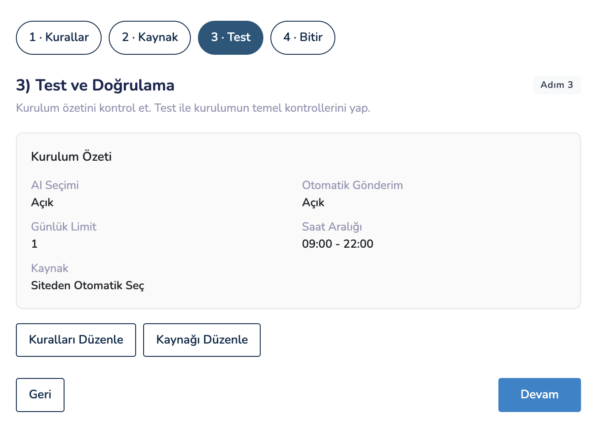
Step 3: Testing and Verification
In the final step, all your settings are summarized, and sample content analyzed by AI Autopilot is displayed.
This screen allows you to preview how the system will operate.
To complete the setup, click the Save and Continue button.
After Setup
After completing the setup, you can access the AI Autopilot dashboard via the Go to Autopilot Panel button.
You can monitor AI Autopilot’s daily operations and deliveries from this panel.
AI Autopilot Usage and Dashboard
The AI Autopilot dashboard allows you to monitor how the system operates in real-time, which content is selected, and the delivery process in detail.
Top Summary Boxes
At the top of the dashboard, there are summary boxes showing the daily performance of AI Autopilot.
- Today’s Candidates: Number of content items selected for today
- Sent Notifications: Number of notifications sent by AI Autopilot today
- Conversions: Number of conversions generated via AI Autopilot
Delivery Status and System Health
In the Notification Delivery Status section located at the bottom left, you can see the last sent notification time and the next scheduled delivery time.
The AI Status section on the bottom right indicates whether the system is actively running.
Next Notification and Candidate Content
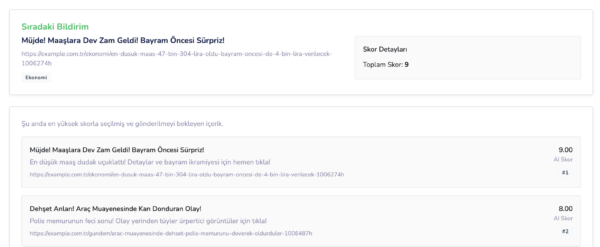
In the middle section of the dashboard, the Next Notification area displays a preview of the upcoming push notification.
Below this, there is a ranked list of candidate content analyzed and scored by AI.
The content with the highest score is selected as the next notification.
AI and Auto Send Settings
The AI and Auto Send toggles at the top of the dashboard correspond to the settings configured in the first step of the setup.
- If AI is turned off, the system stops completely
- If Auto Send is turned off, content is selected but sending is done manually
Manual Sending with Candidate Content
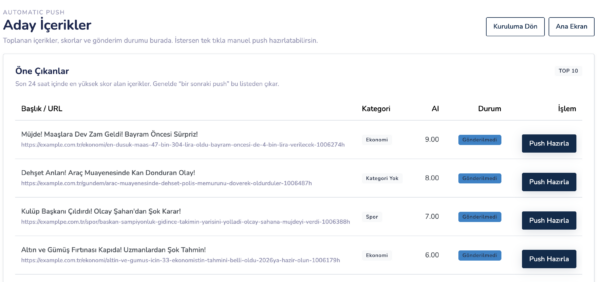
When Auto Send is disabled, you can view all content analyzed by AI Autopilot via the Candidate Content button.
For each content item, you can click the Prepare Push button to go directly to the notification creation screen and send it manually.
Automatically Generated Notification Content
All notification titles and descriptions generated by AI Autopilot are automatically created in alignment with the content.
This allows you to send high-performance push notifications with minimal manual effort.