
To send push notifications, your website must be technically integrated with Bildirt. This integration consists of creating an application, adding the required code to your site, and ensuring the service worker file is functioning correctly.
1. Creating an Application
As the first step, you need to create an application in the Bildirt dashboard for the website you want to send notifications from.
- Click the Add New Application button from the dashboard
- Enter your website name and URL
- Create the application
2. Adding Installation Codes to Your Website
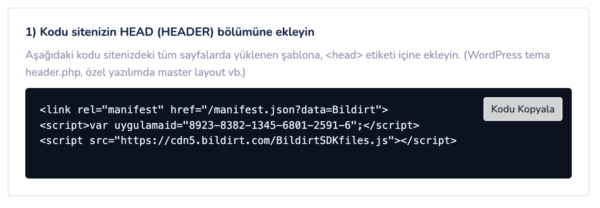
After creating the application, unique installation codes are automatically generated for you. These codes ensure that manifest.json and BildirtSDK-sw.js work correctly.
- The installation code should generally be added inside the
<head>tag - Make sure the code is loaded on all pages of your website
3. What is manifest.json?
manifest.json is a configuration file that defines how your website is presented to the browser for push notifications.
- Contains application name and icon information
- Ensures push notifications are displayed correctly
Push subscription cannot be initiated without the manifest.json file.
4. What is BildirtSDK-sw.js (Service Worker)?
BildirtSDK-sw.js is the service worker file that enables push notifications to function in the background.
With this file, notifications can be delivered to the user’s device even if the browser is closed.
Push notifications cannot be sent without a service worker.
5. Verifying the Installation
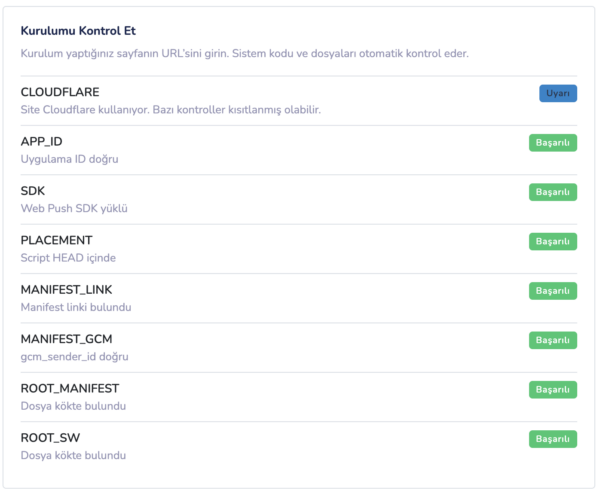
After completing all steps, the installation status is automatically checked via the Bildirt dashboard.
- The manifest.json file must be accessible
- The BildirtSDK-sw.js service worker must be active
If both files are functioning correctly, the installation is marked as successful.
Next Step
After completing the installation, you can start collecting push notification permissions from your users.
In the next section, we will cover Subscription Management.