
Subscription management covers the creation and control of the audience to which push notifications will be sent. In Bildirt, subscriptions are automatically created based on the user’s consent given عبر the browser.
How is a Push Subscription Created?
When a user visits your website and grants permission for push notifications, Bildirt automatically registers this user as a subscriber. This process occurs entirely at the browser level.
- Explicit user consent is obtained
- Subscription data is securely stored
- No additional forms or registration are required
Subscriber List
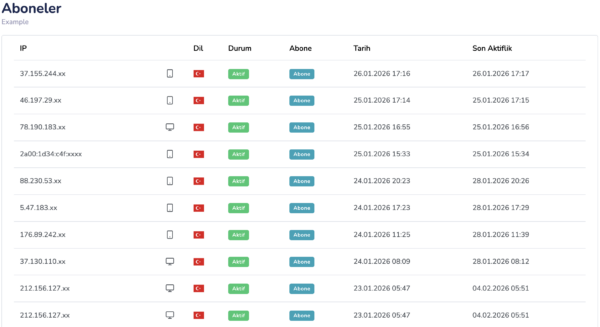
All created subscribers are listed under the Subscribers section specific to the application. In this area, you can view the total number of subscribers and track changes over time.
- Total number of subscribers
- Daily / weekly subscriber growth
- Browser and device distribution
Unsubscribe
Users can opt out of push notifications at any time. This action is performed entirely through the user’s browser settings.
- When a user disables notifications, they are automatically removed from the list
- Bildirt automatically cleans up invalid subscriptions
No manual action is required during this process.
Browser and Device Compatibility
Push subscriptions are specific to the browser and device. The same user may be registered as separate subscribers when using different browsers or devices.
- Modern browsers such as Chrome, Edge, and Firefox are supported
- Works on both desktop and mobile devices
Security of Subscription Data
Bildirt securely stores subscription data and does not share it with third parties. Subscriptions are used solely for sending notifications.
This structure complies with data protection regulations such as GDPR and KVKK.
Next Step
Once your subscribers are created, you can start sending notifications to them.
In the next section, we will cover Notification Delivery.