
Why Do Some Notifications Show as “Possible Spam”?
Recently, some users on Android devices have started seeing web push notifications with a warning such as “This notification may be spam”.
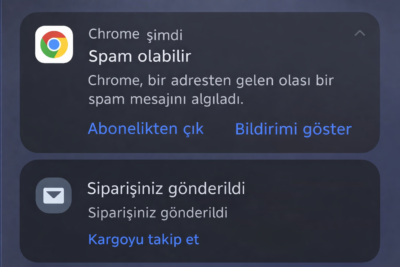
This is not a technical issue related to Bildirt.
As of May 2025, Google Chrome (Android) introduced a new on-device spam filtering system for web push notifications.
In this guide, we explain what changed, why some notifications are flagged, and how to reduce the risk.
How Does Chrome’s New Notification Filter Work?
Chrome now evaluates notifications on Android devices as follows:
- The notification is delivered to the device
- Chrome analyzes content and user behavior
- If considered risky, a warning is shown instead of the content
Users may see options like:
- Unsubscribe
- See notification
So technically, the notification is sent, but in some cases the content is hidden.
Why Do Some Users See It Normally While Others Don’t?
The filter does not behave the same for every user.
Chrome evaluates:
- Whether notifications are clicked
- Whether they are frequently dismissed
- Whether similar messages are repeated
Based on this, each user gets a trust score.
Therefore:
- The same notification may appear normally for some users
- Others may see a spam warning
This behavior is determined by the browser’s on-device decision system, not the sending infrastructure.
What Triggers the Spam Filter?
1. High Notification Frequency
Sending too many notifications in a short time is one of the most common triggers.
Sending dozens of notifications per day (e.g., 50–70+) may be perceived as disruptive behavior.
In such cases, Chrome may hide new notifications even if the user hasn’t explicitly blocked them.
2. Sensational or Clickbait Language
Risky patterns include:
- SHOCK
- URGENT
- Click now
- Don’t miss
- Last chance
- Free / FREE
- Excessive 🚨 emojis
- System-like messages
Example:
Risky: SHOCK INCIDENT!
Safer: New details about the incident in the city center
3. Repetitive Messages
- Sending the same notification repeatedly
- Using very similar headlines
- Duplicate content
This behavior can generate spam signals.
4. Low User Engagement
If users:
- Consistently dismiss notifications
- Never click them
Chrome may start hiding future notifications.
Impact on Notification Performance
- CTR may decrease
- Unsubscribe rates may increase
- Notifications may appear as sent but not seen
Important: Chrome does not send feedback to systems when filtering occurs.
How to Prevent It
Reduce Sending Frequency
- Avoid sending too many notifications in a short time
- Group less important content instead of sending individually
- Back-to-back sends increase filtering risk
Use Neutral Language
- Avoid overly sensational wording
- Prefer clear and informative titles
- Reduce alarm-triggering words
Avoid Repetition
- Do not resend the same notification shortly after
- If necessary, change the headline completely
Space Out Your Notifications
- Avoid sending multiple notifications at the same minute
- Spacing them out can improve visibility
Note: Although this change may seem restrictive at first, it ultimately creates a healthier notification ecosystem by prioritizing meaningful engagement.
Conclusion
This is not a delivery issue or a problem with Bildirt:
- It is caused by Chrome’s new Android behavior
- It does not affect all users equally
- It is mostly related to content style and frequency
When notification strategy is improved, visibility typically returns to normal.
If you’d like, you can share your sample notifications with us—we can review them together.